FIELD REPORTING, REBUILT

Every Defect. Zero Desk Time.

Inspector Baseline turns defect photos into approved AI descriptions and polished PDF reports before you finish your site inspection.

Inspector Baseline app showing an inspection project with defect photos and a generated report summary

AI DESCRIPTION

AI writes it. You approve it.

Snap a photo of a defect and Inspector Baseline drafts a structured, professional description in seconds—covering location, severity, and likely cause. You review, edit if needed, and move on. No more staring at a blank text box on-site.

95% detection accuracy • 30% faster report completion

Inspector Baseline drafting an AI defect description from a photograph of a cracked wall

From first image to final report.

Step one: create an inspection project and select a section in Inspector Baseline

01 — CREATE

Create a project

Step two: capture inspection photos in Inspector Baseline

02 — CAPTURE

Click images.

Step three: Inspector Baseline generating structured defect descriptions from photos

03 — DESCRIBE

Generate descriptions.

Step four: finalise a client-ready inspection report in Inspector Baseline

04 — FINALISE

Finalise report.

Comparison

No more app-hopping.

No more app-hopping.

No more app-hopping.

Photos, notes, severity ratings, and reports—all built to live in six different apps. Inspector Baseline puts them in one.

Photos, notes, severity ratings, and reports—all built to live in six different apps. Inspector Baseline puts them in one.

Before Inspector Baseline

Before Inspector Baseline

Before Inspector Baseline

Juggling apps, scattered files, and messy handoffs. Too many tools, too little time.

AI Description

ChatGPT

Automated Reports

Word Doc

Audit Trails

Notebook

Digital Library

Google Drive

Calendar Sync

Paper Diary

Teams

Group Chat

Six disconnected tools. Six places for detail to fall through the cracks.

Six disconnected tools. Six places for detail to fall through the cracks.

After Inspector Baseline

After Inspector Baseline

After Inspector Baseline

All your workflows, united in one hub—seamless, simple, and built for how you already inspect.

AI Description

Automated Reports

Audit Trails

Digital Library

Calendar Sync

Teams

DEFECTECH — ONE HUB

AI Description

Automated Reports

Audit Trails

Digital Library

Calendar Sync

Teams

Trusted where precision matters.

Trusted where precision matters.

Trusted where precision matters.

“Defectech has made site inspections faster. The photo workflow and report outputs are simple, clear, and very professional.”

“Defectech has made site inspections faster. The photo workflow and report outputs are simple, clear, and very professional.”

Aby

Independent Building Inspector, NSW

“The annotation tools and audit trail are useful. It helps us document issues properly and communicate them clearly to clients.”

“The annotation tools and audit trail are useful. It helps us document issues properly and communicate them clearly to clients.”

Patrick

Heritage Specialist, VIC

“Setup was straightforward and the team picked it up quickly. It reduced friction in our reporting process.”

“Setup was straightforward and the team picked it up quickly. It reduced friction in our reporting process.”

Michael

Building Inspector, NSW

BASELINE REPORT / PDF

D-014 • MODERATE
Photo, description, rating, and recommended action—already formatted.

AUTOMATED REPORTS

From images to finished PDF, automatically.

Every photo, description, and severity rating you capture on-site assembles into a polished, client-ready PDF report—before you’ve even left the property. No manual formatting, no copy-pasting into Word.

Built for the full inspection workflow.

Overview of Inspector Baseline features including defect detection, audio notes, digital library and automated reporting

SAMPLE REPORT

See a complete inspection report.

Explore a polished example of the evidence, annotations, and actions your team can share with clients.

Download sample report
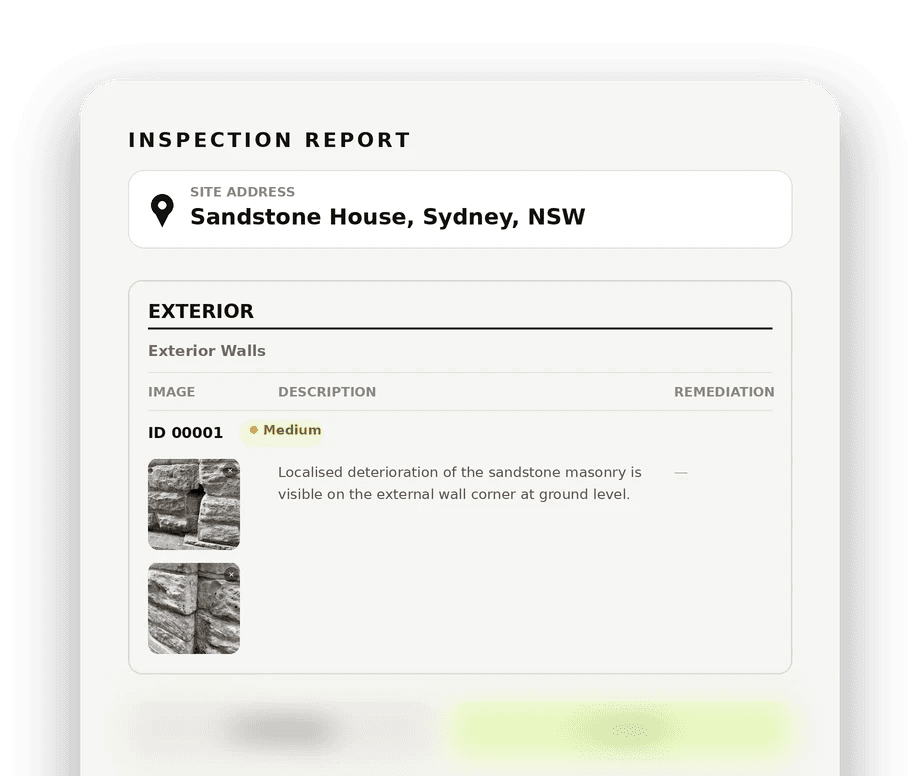
Sample Defectech inspection report
Modern building facade representing the property and construction industries Defectech serves

Industries We Serve

Keep evidence, reporting, and portfolio decisions in one clear inspection workflow.

Building Management
Ensure assets across your portfolio remain safe and sound without interrupting operations.

Engineering
Turn visual capture into reliable evidence for photogrammetry and inspection jobs.

Heritage
Protect historic sites with precise assessments and a defensible evidence trail.

Insurance
Manage asset evidence efficiently and keep reports ready when a decision is challenged.

INSPECTOR BASELINE

Stop Writing. Start Inspecting.

Stop Writing. Start Inspecting.

Stop Writing. Start Inspecting.

Inspector Baseline mobile app capture screen used to photograph building defects
Inspector Baseline desktop workspace used to finalise inspection reports

© 2026 Defectech Inspector Baseline